

Documentation Index
Fetch the complete documentation index at: https://www.renderjuice.com/docs/llms.txt
Use this file to discover all available pages before exploring further.
How We Release
We work internally according to semver conventions (thatv2.3.9 thing you see everywhere), but semver is pretty technical and not easy to digest. So we organize releases in a way that’s more predictable and manageable for you. For larger announcements, check out our What’s New blog.
- Major (X.0) version upgrades are big changes that we think are worth spending extra time communicating to you due to potential benefits.
- Minor (X.Y) version upgrades can loosely be interpreted as feature additions, or notable updates!
- Patch (X.Y.Z) version upgrades are usually smaller changes that we don’t think are worth a full announcement, but they do eventually stack up to help make Renderjuice better.
New Performance Page, Clearer Navigation & Steadier Render Handling
Key Summary- There is now a dedicated performance page that makes it easier to understand how Renderjuice speeds up renders and where the platform fits for different workflows.
- The main site navigation is clearer and more polished, with better paths into docs, updates, GPU research, and other key resources.
- Render handling is also more stable behind the scenes, reducing the chance of jobs getting tripped up by stalled background workers.
A New Performance Page for Product Research
There is now a dedicated performance page that explains Renderjuice speed, scale, and workflow benefits in one place instead of scattering that context across multiple pages. If you are comparing options or trying to understand how Renderjuice handles larger or more demanding Blender workloads, it should now be much easier to get that overview quickly.Easier Navigation Across Key Resources
We also refreshed the site navigation so important destinations are easier to discover and move between. Resources like the GPU catalog, docs, product updates, roadmap, and related browsing pages are surfaced more clearly, and smaller navigation polish fixes make the header feel cleaner and more dependable while you move around the site.Better Stability for Background Render Processing
We also improved some of the background worker handling that supports active renders. In practice, that should reduce a class of edge cases where supporting processes become unhealthy after long idle periods or awkward restarts, leading to steadier job handling overall.Smarter Extension Research, Safer Upload Start & Steadier Long Renders
Key Summary- The extensions catalog is much more useful for real Blender research, with richer scoring, clearer Renderjuice-tested signals, and more practical setup guidance before you install.
- Uploading a file is less likely to start from a confusing workspace state, because region selection is now handled more deliberately before file selection begins.
- Long or uneven renders should behave more steadily, with fewer cases where workers get treated as slow too early.
Richer Extension Discovery & Setup Guidance
The extensions catalog now does a better job helping you evaluate what to use before you commit. You can sort and filter with more confidence, spot which options are Renderjuice-tested more easily, and review more practical setup and render-farm guidance directly in the browsing experience. We also expanded the catalog coverage, making the page more useful as a real research tool instead of just a simple list.A Safer Start Before You Upload
Starting a render from a fresh or not-yet-configured workspace is now less awkward. The upload flow waits for the right workspace settings to load first, and if your storage region still needs attention, it can guide you into that setup before file selection continues. The onboarding copy around region choice is clearer too, so it is easier to understand what needs to happen and why.Better Stability for Slow or Uneven Renders
We also tightened how Renderjuice decides when a running job is actually slow enough to need intervention. In practice, that should reduce false slow-worker reactions on renders where work starts unevenly across machines, leading to steadier progress and fewer avoidable disruptions on longer or more complex jobs.Smarter Billing Feedback, Safer Reuse & Better Blender Browsing
Key Summary- Billing now makes subscription cancellation timing clearer and gives you faster paths back to the right billing page when you need to manage changes.
- Reusing a previous validation is safer and less confusing, with better rules for when the option appears and clearer recovery if reuse no longer applies.
- Blender-focused browsing pages are more useful and stable, with richer feature coverage, direct links to related extension details, and fewer awkward page-load issues.
- Reliability improvements reduce the chance of renders stalling or being failed too aggressively when workers hit temporary problems.
Clearer Billing Status & Shortcuts
If a subscription is set to end at the close of the billing period, that timing is now surfaced more clearly in the billing experience so you can understand what is happening without guessing. Navigation back into billing is also smoother, with quicker paths from the app into the right settings area when you need to review or manage your plan.Safer Validation Reuse Before Render Start
The skip-validation path is now more deliberate. It only shows up when there is a previous validation to reuse, and it turns itself off when you change important render details like the file path, scene, or add-ons. If reuse is no longer available, the app now resets that state cleanly and explains the issue more clearly instead of leaving you in a confusing half-valid setup.Better Blender Page Discovery & Stability
The Blender section of the site now does a better job highlighting supported capabilities, linking to related extension details, and presenting that information in a cleaner layout. We also fixed a browser-side issue that could cause awkward page behavior, so those pages should feel more dependable while you browse.Stronger Recovery from Worker Problems
We also tightened how Renderjuice handles temporary worker trouble during active jobs. In practice, that should reduce cases where background processing stalls silently or a render gets failed too quickly after worker trouble, leading to steadier progress and better recovery on difficult runs.Cleaner Navigation, Better Accessibility & Stronger Page Previews
Key Summary- Browsing the site and docs is smoother, with clearer page summaries, better accessibility text, and more dependable internal navigation.
- Small polish fixes reduce awkward loading behavior and make key parts of the site feel cleaner and easier to scan.
- We also published a concise 2026 GPU guide for readers researching Blender hardware: Best GPUs for Blender 2026.
Clearer Content Previews & Page Summaries
We improved how pages describe themselves across the docs and marketing site, so shared links, previews, and search results should now do a better job explaining what a page is actually about before you click through. That makes the site easier to navigate, easier to trust, and less reliant on guesswork.Better Accessibility Across Key Browsing Paths
Some smaller but worthwhile browsing issues were cleaned up too. Image descriptions are now more specific in key places, which makes visual content clearer and more accessible when you’re moving through the site or reviewing featured sections.Smoother Navigation & Fewer Small Frictions
The site logo now appears more smoothly without the old loading lag, and a few broken internal docs links were fixed so navigation through Blender learning content feels less brittle. Day to day, this should make everyday browsing feel a little more polished and dependable.GPU Compare Tools, Better Discovery & Smoother Browsing
Key Summary- GPU research is much more useful now, with richer filtering, side-by-side comparison, and clearer detail pages across the GPU catalog.
- Content discovery is better across the site, making it easier to browse related updates and posts by tag.
- A handful of browsing annoyances were cleaned up too, including faster logo rendering and fixes for broken documentation links.
Compare GPUs More Easily
This release adds a much stronger GPU browsing experience, including richer filtering and sorting plus a dedicated side-by-side comparison flow. If you’re trying to decide which GPU is a better fit for Blender work, it should now be easier to narrow the list, compare options directly, and understand tradeoffs without jumping between multiple tabs.Clearer GPU Pages & Better Research Flow
GPU detail pages also feel more useful and focused, with clearer summaries, more relevant specs, and a more direct path into comparison. The overall research flow is smoother whether you’re browsing from the catalog, checking a specific card, or looking for a quick answer on performance and fit.Better Content Discovery Across the Site
We also improved how content is organized and connected, including better tag-based browsing for posts and updates. That should make it easier to move between related topics and find more of the information you’re actually looking for instead of relying on search or manual digging.Small but Helpful Browsing Fixes
On top of that, a few smaller issues were cleaned up. Site branding now appears more smoothly without an awkward loading flash, and some broken docs links were fixed so navigation through Blender learning content feels more dependable.Smarter Feedback After Completion & Stronger Render Stability
Key Summary- The post-render feedback flow is now more specific and useful, making it easier to explain what went well or what needs attention after a job finishes.
- File and scene-related lists now stay better aligned with the workspace you’re actually in, which should reduce stale or confusing results after switching workspaces.
- Render handling is steadier on uneven or awkward workloads, helping jobs recover and finish more predictably instead of getting stuck in fragile edge cases.
More Useful Feedback After a Render
The feedback flow after completion now gives you more structured ways to explain how a render went instead of limiting you to a simple thumbs up or thumbs down. That should make it easier to share meaningful feedback quickly, especially when you want to point to a specific issue or leave a short note about what happened.Fewer Stale File Lists After Workspace Changes
This release also improves how file-related data behaves when you move between workspaces. In practice, lists should now refresh more reliably for the workspace you’re actually viewing, which helps reduce cases where older or unrelated results linger longer than they should.Better Stability for Difficult Render Runs
We also tightened render orchestration and recovery behavior for trickier jobs, especially when work is unevenly distributed or workers are not progressing the way they should. The user-facing result should be steadier job handling, fewer strange stalls, and more predictable progress when a render needs extra coordination behind the scenes.A Smoother External API Workflow
Key Summary- External API integrations can now upload a source file first and create the render job afterward, making automation easier to structure and retry.
- File uploads and job creation are now separated into a cleaner two-step flow, which is especially helpful for custom tools and pipeline integrations.
- Account settings now give clearer guidance when your email verification is still pending, so it is easier to refresh that state without guessing.
Upload Files First, Create Jobs When You’re Ready
External API users can now start by uploading a.blend or .zip file through a dedicated upload step, then create the job afterward once that upload is in place. This makes custom automation easier to reason about because file transfer and job creation no longer have to happen at the exact same moment.A Cleaner Automation Path for Integrations
This release also makes the external job-creation flow more straightforward for API-driven workflows. If you’re building your own integration, you now have a clearer path for moving a file into Renderjuice and then turning that upload into a render job, which should make retries and orchestration feel less awkward.Clearer Email Verification Guidance
For accounts that still show email verification as pending, the settings page now does a better job explaining what to do next. Instead of leaving that state feeling ambiguous, the app now points you toward re-signing in so the verification status can refresh properly.Faster Downloads, Better Progress & Smoother Finalizing
Key Summary- Render setup now supports Blender v5.1.0, making it easier to submit newer projects without changing versions first.
- Render progress is now more accurate and easier to trust, with percent-based updates that better reflect real rendering work as it happens.
- Downloads are significantly faster when you use Fast Download options, because completed frames can now be optimized earlier while a render is still running.
- In-progress status feels smoother and clearer, especially as jobs approach completion and enter their finalizing phase.
- Reliability fixes reduce a queue edge case that could otherwise interrupt progress behind the scenes.
Faster Optimized Downloads
When you use Fast Download options, completed frames can now be optimized earlier during the render instead of waiting until the very end. That makes the wait for optimized downloads significantly shorter after completion, with average improvements of roughly 50-80%.More Accurate Render Progress
Progress updates now do a better job reflecting what your render is actually doing instead of feeling jumpy or overly rough. This should make active jobs easier to monitor, especially on newer Blender versions and longer renders where small progress shifts matter more.Blender v5.1.0 Support
This release also adds support for Blender v5.1.0. If you’re working in newer Blender projects, you should have a smoother path to uploading and rendering them without needing to step back to an older supported version first.Clearer Finalizing Feedback & Better Reliability
The progress experience is also smoother as a job gets close to done. Rather than feeling like a render is stuck at the very end, the UI now does a better job showing that the job is in its finalizing stage and still moving toward completion. We also fixed a background reliability edge case that could cause unnecessary hiccups while jobs were being handed off, leading to steadier render handling overall.Smarter Render Feedback, Easier Cancellation & Stronger Reliability
Key Summary- Render feedback is easier to give, with a simpler thumbs up or thumbs down flow after completion and clearer follow-up options when something went wrong.
- Cancelling a render is smoother, with reason capture built directly into the flow instead of feeling like an extra step.
- Render jobs are less likely to get routed back onto machines that are repeatedly failing, which should reduce repeat issues on unstable jobs.
- Reliability improvements also make worker coordination steadier behind the scenes, helping avoid edge-case interruptions during render handling.
Simpler Feedback After a Render
The post-render feedback flow is now much easier to use. Instead of a heavier form experience, you can respond with a simple thumbs up or thumbs down, with the option to add more detail when needed. That makes it faster to share useful feedback without interrupting your workflow.A Smoother Cancellation Flow
Cancellation now feels more direct and better integrated into the render experience. When you stop a render, the reason capture happens as part of the same flow, with clearer choices and better handling for cases where you already have visible output. Submission behavior is also more reliable, which should help avoid duplicate actions or awkward dialog states.Better Protection Against Repeated Machine Issues
Renderjuice now does a better job steering work away from machines that are showing repeated failure patterns. In practice, that should reduce the chance of a job getting sent back to the same problematic machine and improve recovery when infrastructure issues appear.Steadier Worker Coordination
We also tightened some background worker coordination around task handoff and splitting. The user-facing result should be fewer odd edge cases where render progress or recovery feels less predictable than it should.Better Light Mode, Smarter Render Setup & Stronger Reliability
Key Summary- Light mode is noticeably cleaner across render setup, settings, and account screens, making the app easier to read during longer sessions.
- Render configuration is easier to review and adjust before launch, with richer controls for frame ranges, resolution, camera or view-layer choices, and output settings.
- Render details and in-progress status UI are clearer, so it is easier to confirm what will run and follow what is happening.
- We expanded coverage around uploads, downloads, compression, and render file transfers, helping us catch regressions faster and ship related fixes more safely.
A Cleaner, Easier-to-Read Light Mode
This release puts noticeable attention into how the app feels in light mode. Across key screens like render setup, settings, and account views, surfaces, spacing, and text treatment have been refreshed to make the interface feel brighter, cleaner, and easier on the eyes during longer sessions.Easier Override Editing Before Render Start
You can now make more of your final render choices directly from the configuration editor, including frame ranges, resolution, output settings, camera overrides, and view-layer selection. This makes it easier to fine-tune a job before launch without bouncing between multiple screens or second-guessing which settings will be applied.Clearer Render Details & Progress Feedback
The render details experience has been refreshed to make important settings easier to scan once your file has been analyzed. Output behavior, device choices, scene selection, and frame details are presented more clearly, while progress indicators and billing labels have been polished so everyday status and account information are easier to read at a glance.Faster Detection of Render Pipeline Regressions
We also expanded the coverage and safeguards around key render lifecycle signals such as uploads, downloads, compression, and file-transfer behavior. That gives us earlier warning when something regresses and helps us resolve performance or delivery issues faster, while stronger release checks make related reliability updates safer to ship.Better Recovery for Runtime-Failed Renders
Key Summary- Renders that fail during runtime can now preserve completed work more reliably instead of feeling like all progress was lost.
- Partial frame ZIP downloads are now available for more failed-render cases, making it easier to recover usable output after a crash.
- Reliability improvements help failed-render post-processing complete more consistently once a job reaches a terminal failed state.
Recover More Work After a Runtime Failure
If a render fails after it has already started running, Renderjuice now does a better job preserving the frames that were completed before the failure. That makes runtime failures less frustrating and gives you a better chance of salvaging useful output instead of restarting entirely from scratch.ZIP Downloads for Failed Jobs
Failed renders can now expose partial ZIP downloads in more cases, similar to the recovery experience for other interrupted jobs. This makes it easier to download what finished successfully, inspect results, and decide what to rerun next.Stronger Failed-Render Processing
We also improved the reliability of the follow-up work that happens after a runtime failure so downloadable outputs are generated more consistently. The result should be a steadier recovery path when a render crashes after work has already been completed.Frame-Step Rendering & Better Partial Output Recovery
Key Summary- Frame ranges now support stepped intervals like
1-100x5, making it easier to render every Nth frame without building long manual lists. - Test renders and frame counting now stay aligned with stepped frame ranges, so preview passes are more predictable.
- When a render is paused because your workspace runs out of minutes, completed frames are handled more reliably and remain easier to recover as downloadable outputs.
- Reliability fixes reduce edge cases where repeated pause/suspension events could interfere with partial output processing.
Render Every Nth Frame More Easily
You can now enter stepped frame ranges such as1-100x5 to render every fifth frame instead of every frame. This is especially useful for look-dev, spot checks, preview passes, and other workflows where you want fast feedback without committing to a full frame range. It removes the need to manually type long lists or split a job into multiple smaller ranges.More Predictable Test Renders
Stepped frame ranges now work more consistently across render setup, validation, and test render behavior. In practice, that means your frame selection, preview expectations, and total-frame calculations stay in sync more reliably when you use a frame step.Better Recovery for Paused Renders
If a render is paused because your workspace runs out of minutes, completed frames are now processed more reliably into partial downloadable outputs. This makes it easier to recover work that already finished, review what rendered successfully, and decide what to re-run next instead of feeling like progress was lost.Stronger Reliability Around Repeated Pauses
We also fixed an edge case where repeated pause or suspension events could interfere with partial output handling. This should make recovery behavior more consistent if a render is interrupted more than once.Faster Downloads for Cancelled Renders & Onboarding Improvements
Key Summary- Cancelled renders now produce downloadable outputs — any frames that finished before cancellation are packaged and ready to download, just like a completed render.
- The upgrade page is clearer about Custom Plan options and Enterprise pricing.
- Payment success screens reflect your account changes faster after checkout.
- Global banner actions are more visible and easier to tap.
- Internal tooling and monitoring improvements to keep renders running smoothly and resolve issues faster.
Download Outputs from Cancelled Jobs
Previously, cancelling a render meant losing any frames that had already finished. Now, when you cancel a job, any completed frames are automatically packaged and available for download — right from the render details page. You can review partial results, use completed frames right away, or adjust your frame range for the next job to only cover what’s missing. The download experience works just like it does for completed renders.Clearer Upgrade & Enterprise Options
The upgrade page now explains the Custom Plan option more clearly — create your own monthly plan with exactly the minutes you need. The former “Need more?” section is now labeled “Enterprise” with updated messaging about volume discounts and custom integrations, making it easier to find the right plan for your team.Faster Payment Confirmation
After completing a checkout, the payment success screen now reflects subscription and credit changes more quickly so you can get back to rendering without waiting.Polished Global Banners
Action links in site-wide banners are now styled as pill buttons instead of underlined text, making them easier to spot and tap on both desktop and mobile.Platform & Reliability
- Improved internal tooling for monitoring render infrastructure across cloud providers, helping the ops team identify and resolve performance issues faster.
- Added the ability for ops to quickly take problematic machines out of rotation, reducing the chance of failed or slow renders.
- Streamlined internal billing and support workflows so the team can resolve payment and subscription questions faster.
- Enhanced error tracking and monitoring so we can catch and fix issues before they affect your renders.
- Internal tooling improvements to help the support team diagnose job issues more quickly when you reach out.
Faster Checkout Follow-Through & Clearer Upgrade Messaging
Key Summary- The payment success experience now reflects subscription and minute updates faster after checkout.
- Upgrade and onboarding copy is clearer around Custom Plan and Enterprise options.
- Banner actions are more visible and easier to tap, especially when guiding you toward the next step.
Faster Payment Success Updates
After checkout, account changes now show up more quickly on the payment success screen instead of feeling delayed or stale. This makes it easier to confirm that your subscription or minutes updated successfully and get back to rendering without second-guessing whether the change went through.Clearer Upgrade & Onboarding Messaging
We also polished the upgrade experience with clearer wording around Custom Plan and Enterprise options. The goal is to make plan choices easier to understand at a glance, especially when you’re deciding whether you need a flexible individual setup or a larger team-oriented option.More Visible Banner Actions
Site-wide upgrade and onboarding prompts are now styled more like clear action buttons instead of blending into surrounding text. That should make important next steps easier to notice and use on both desktop and mobile.Faster Issue Diagnosis & Smoother Recovery
Key Summary- This patch improves the information and controls available when our team investigates render issues.
- Support follow-up should be faster and more precise because job, worker, and storage context is easier to inspect together.
- Recovery actions are more direct when something goes wrong behind the scenes.
Faster Diagnosis When Renders Misbehave
This release is intentionally small and focused on supportability. It improves the quality of the information available during render issue investigation, which should help us identify root causes faster when a job behaves unexpectedly.Smoother Recovery Paths
We also added clearer operational controls around worker handling and related job context. In practice, that should mean faster recovery and less back-and-forth when a render needs intervention after something goes wrong.Faster Support Triage for Job Issues
Key Summary- This patch improves the information available when our team investigates job, project, and worker issues.
- Support follow-up should be faster and more accurate because related job data is easier to inspect and cross-reference.
Faster Investigation When Something Goes Wrong
This release is intentionally small and focused. It improves the quality and organization of the job, project, and worker information available during issue investigation, which should help our team diagnose problems faster when you reach out for help.Clearer Context for Follow-Up
Related records are easier to inspect together, and important fields are presented more clearly during investigation. In practice, that should mean less back-and-forth and quicker answers when a render or workspace issue needs support follow-up.Faster Uploads, ACH Payments & Reliability Improvements
Key Summary- Upload speeds are significantly faster — files now route to the nearest storage location, reducing latency especially for users further from our primary data centers.
- Enterprise customers can now pay via ACH bank transfer for subscription billing.
- Double-clicking “Start render” no longer causes a false failure or consumes a free render.
- Infrastructure improvements to keep renders running smoothly and resolve issues faster.
Faster Upload Speeds
We now route uploads to the nearest storage location instead of a single central region. This dramatically reduces upload latency, especially if you’re far from our primary data centers. Large scene files that previously took minutes to transfer should feel noticeably snappier. This was one of our most-requested improvements — thank you for the feedback.ACH Bank Transfer Payments
Enterprise customers can now pay for subscriptions via ACH push (bank transfer). If your organization prefers bank payments over credit cards, reach out to our team to get set up. The full subscription lifecycle — creation, invoicing, and renewals — is supported.Reliable Render Start
Previously, quickly clicking “Start render” more than once could trigger a duplicate request that failed and incorrectly consumed a free render credit. Render start is now idempotent — extra clicks are safely ignored, so you won’t lose credits or see confusing error states.Platform & Reliability
- Improved internal tooling for downloading and inspecting scene files, helping the support team diagnose job issues more quickly when you reach out.
- Added controls for ops to stop and replace problematic workers without a full redeployment, reducing downtime during incidents.
- Enhanced file storage diagnostics so we can pinpoint and resolve upload or download issues faster.
Foundational Stability & More Accurate Reporting
Key Summary- This patch is mostly foundational work aimed at making the platform easier to support and operate reliably.
- Reporting windows are handled more accurately, which helps us investigate issues and validate fixes with better data.
- You should not expect major workflow changes in the product from this release, but it strengthens the systems behind day-to-day reliability.
More Accurate Reporting Windows
We tightened the way date-based reporting windows are interpreted so day-range views are more consistent and dependable. That gives us better information when tracking issues, monitoring trends, and confirming that fixes are working as expected.Stronger Operational Foundations
This release also improves some of the behind-the-scenes foundations used to run and support Renderjuice. While the changes are not especially visible in the product itself, they help us respond faster, reduce setup friction, and keep the platform steadier as it grows.Faster Render Setup, Smarter Previews & Stronger Reliability
Key Summary- New scene-selection flow helps you pick valid scenes faster and avoid setup mistakes before render start.
- One-click test render settings make it easier to run fast trial renders before full-quality runs.
- Render details editing is clearer and more consistent across key settings fields.
- Validation feedback for missing project files is clearer, so fixes are faster and less guessy.
- Preview thumbnails are now selected more reliably, reducing wrong or missing preview frames.
- Copy actions now fail gracefully with clear feedback instead of silently doing nothing.
- API key and webhook management flows are more responsive, with better loading and success feedback.
- Repeated renders of similar scenes can start faster.
- Broader stability improvements reduce edge-case failures and make render progress more predictable.
- Release quality improvements reduce update risk and help us ship fixes more safely.
- Monitoring and telemetry improvements help us detect and resolve platform issues faster.
- Support triage automation improvements reduce duplicate issue noise and speed up response time.
- Build and test pipeline hardening lowers the chance of regressions in future releases.
- Documentation updates clarify recent video output behavior and expected results.
Guided Setup Before You Start
The render setup flow now puts scene selection and validation cues front and center, so it’s easier to pick the right scene and catch issues before you launch. This cuts down on misfires and restarts during setup.One-Click Test Render Mode
You can now apply test-oriented settings in one click to run a quick, lower-commitment render pass. It’s a faster way to verify framing, scene choice, and output expectations before spending time on a full run.Better Render Details Editing
We improved the editing experience in render details so field behavior is more consistent and feedback is clearer while you make adjustments. Small but frequent actions now feel more predictable and less error-prone.Clearer Validation Feedback for Missing Files
When required files are missing after validation, the UI now surfaces that state more clearly and helps you act on it sooner. This shortens the back-and-forth when troubleshooting file issues.More Reliable Previews & Copy Actions
Preview selection now behaves more consistently, so the frame you see is less likely to be wrong or missing. We also improved clipboard behavior across render screens, with explicit failure feedback when your browser blocks copy actions.Smoother Integration Management
Settings pages for API keys and webhooks are now more responsive, with clearer loading states and confirmation behaviors. This makes workspace integration setup and maintenance feel faster and more dependable.Faster Repeats & Better Overall Stability
Repeated renders of similar scenes can start faster, and reliability improvements across the render lifecycle reduce edge-case disruptions. Day-to-day, this should feel like fewer odd failures and steadier progress from validation through completion.Better Release Quality and Response Time
This release also includes behind-the-scenes quality improvements in delivery, monitoring, and support triage. For you, that translates to safer rollouts, faster issue detection, and quicker follow-up when something goes wrong.Stronger Build and Test Reliability
We improved our build and test reliability so changes are validated more consistently before release. This helps reduce regression risk and supports more stable day-to-day platform behavior.Maintenance and Documentation Improvements
We also shipped maintenance cleanups and documentation clarifications that improve long-term platform stability and make recent output behavior easier to understand.Download Reliability Patch
Key Summary- Improved reliability around video download actions.
- Better safeguards around downloads help us detect and resolve issues faster.
What This Means for You
This patch is intentionally small and focused on reliability. You should see fewer odd edge cases during download actions, and faster support resolution if issues occur.Video Outputs, Billing Clarity & Faster Recovery
Key Summary- Enable optional MP4 outputs and download videos directly from the render preview (with segmented downloads when needed).
- Billing now includes invoice history with PDF downloads and clearer payment success messaging.
- Past-due and low-minutes banners guide you to fix billing or top up minutes; plan changes are paused until payment is fixed.
- Scene-not-found errors now show available scenes, let you copy names, and let you retry with one click.
- Render configuration can prefill scene, file path, and add-ons when you spin up a new job from a previous file.
- Uploads respect your preferred storage region and handle large multipart uploads more reliably, with clearer errors when a region is missing.
- API/CLI uploads now use presigned URLs when temporary upload credentials aren’t supported; you’ll get a clear error if you request the wrong flow.
- Progress tracking, cancel/resume, and completion are more reliable for multi-segment renders, reducing stuck jobs.
- Render lists and project pages keep bulk-selection actions in a consistent spot so you can manage batches faster.
- Composite output filenames are cleaned up to avoid duplicate frame numbers, and output details are clearer for newer Blender files.
MP4 Video Outputs & Downloads
You can now enable an optional Video (MP4) output in render details. When enabled, an MP4 is generated alongside your frame outputs, and you can download it directly from the render preview. For non-contiguous frame ranges, the UI offers per-segment video downloads so you can grab exactly what you need. Download APIs also include video URLs when available.Billing & Payments
Billing now includes an invoice history table with status, amounts, and one-click PDF downloads, plus pagination for longer histories. Payment success pages now reflect whether you subscribed, changed plans, or purchased minutes so it’s clear what’s next. If a payment fails, you’ll see a prominent banner with a direct path to update billing; if you’re low on minutes, you’ll see a top-up banner. Plan changes are disabled until a past-due payment is resolved.Scene Recovery & Render Setup
When a render fails because the scene name doesn’t exist, we now show the submitted scene and the list of available scenes. You can copy a scene name or spin up a new job prefilled with that scene, file path, and add-ons, so you can retry quickly without re-uploading or re-selecting options.Uploads & Storage Regions
Uploads now use your workspace’s preferred storage region to improve reliability and latency. If a required region isn’t set, you’ll get a clear error instead of a silent failure. Multipart uploads are more resilient for large files and resume/complete in the same upload location. For API/CLI users, uploads now rely on presigned URLs when temporary upload credentials aren’t supported, and you’ll get a helpful error if you request the wrong method.Reliability for Multi-Segment Renders
Progress tracking, cancel/resume, and completion handling now account for renders that run in multiple segments. This reduces stuck jobs, keeps progress indicators accurate, and ensures downloads line up with the final render state.UI Workflow Improvements
Bulk-selection actions now stay in a consistent location on render lists and project pages, so batch actions are easier to find and use. The minute-usage meter also received UI refinements to better match the low-minutes/past-due alerts.Blender Compatibility & Output Details
Render details now show Blender output mode for newer files and clearly explain when MP4 output isn’t available. The supported Blender version list has been refreshed to the latest stable and LTS patches, and composite output filenames no longer duplicate frame numbers.Projects, Multi-Select & Platform Reliability
Key Summary- Organize renders into projects for better workflow management.
- Multi-select renders for bulk actions like assignment and deletion.
- New project detail page with filters, pagination, and bulk operations.
- Improved error pages and dismissible notifications.
- Faster render list loading with database optimizations.
- Better Blender version support with improved compatibility tracking.
- Stats page now displays 2025 activity data correctly.
- Major infrastructure upgrades for improved reliability and performance.
- Graceful maintenance mode means fewer interrupted renders during updates.
Projects
You can now organize your renders into projects. Access the new Projects page from the sidebar to create projects and keep related renders together. Each project has a unique name within your workspace, making it easy to identify different bodies of work.From the renders list, right-click any render to assign it to a project, or unassign it if you change your mind. The new project column in the renders list shows which project each render belongs to at a glance.Each project has its own detail page where you can:- Filter renders by status
- Navigate through pages of results with pagination
- Select multiple renders using checkboxes
- Bulk delete renders you no longer need
- Use the selection toolbar for quick actions
Multi-Select & Bulk Actions
The renders list now supports multi-select. Click the checkbox on any render to select it, then select additional renders to build up a selection. The selection toolbar appears when you have renders selected, giving you quick access to bulk actions like assigning to a project or deleting multiple renders at once. Your selection automatically clears after completing an action.The context menu (right-click) has been enhanced with quick access to project assignment, deletion with confirmation, and other common actions.Improved Error Handling
When something goes wrong, you’ll now see a dedicated error page with helpful context instead of a generic failure. Error handling in the render configuration flow has been improved to surface issues more clearly. These changes make it easier to understand what went wrong and how to fix it.UI Polish
- Dismissible notifications: Toast messages now include a close button so you can clear them immediately instead of waiting for them to auto-dismiss.
- Render stepper alignment: The footer in the render configuration stepper now aligns properly across different screen sizes and breakpoints.
- Custom Plan fix: Fixed an issue where the Custom Plan subscription button wasn’t working correctly.
- Table layout: The renders table has improved minimum width handling for better layout consistency.
Stats Page
The stats page contribution grid now correctly displays 2025 activity data. Activity statistics are properly normalized for the current year.Blender Version Support
We’ve built a new system for tracking Blender releases that pulls from multiple data sources and validates version information more thoroughly. This means:- Faster support for new Blender versions when they’re released
- Better tracking of LTS (Long Term Support) versions
- More accurate compatibility checks for your projects
Performance
- Faster render lists: We’ve added database indexes that significantly speed up render list queries, especially noticeable if you have hundreds of renders.
- Optimized progress tracking: Job progress lookups are now more efficient, reducing unnecessary calculations.
- Faster app updates: Improved caching means the Renderjuice client updates faster when new versions are available.
Platform Reliability
We’ve made significant infrastructure improvements behind the scenes:- Infrastructure migration: Core rendering infrastructure has been migrated to faster, more reliable servers with reduced latency.
- Enhanced monitoring: New telemetry on worker upload and download performance helps us identify bottlenecks and optimize the rendering pipeline.
- Centralized logging: All platform logs are now streamed to a central location, enabling faster diagnosis when you reach out for support.
- Fault-tolerant telemetry: Monitoring processes are now resilient to temporary failures, ensuring we maintain visibility even during edge cases.
- Graceful maintenance mode: We can now pause the render queue gracefully during maintenance windows, reducing the chance of interrupted renders during platform updates.
- Improved file handling: Better configuration for handling large file uploads and downloads across different regions.
- Expanded test coverage: More comprehensive automated testing catches issues before they reach production.
Redesigned Sidebar, EU Tax Compliance & Faster Uploads
Key Summary- Customize your workspace with a resizable, collapsible sidebar.
- EU customers now see accurate VAT at checkout with proper invoices.
- View your billing details directly in settings.
- Faster uploads for files between 100MB and 1GB.
- Improved Blender 5.0 compatibility.
Redesigned Sidebar
The sidebar has been rebuilt from the ground up with a more compact design that gives you more room to work. Drag the edge to resize it to your preferred width, or collapse it entirely for maximum screen real estate. Your preference persists across sessions, so you won’t need to adjust it every time you return. When collapsed, the GPU meter adapts to a compact circular display. You can also toggle the sidebar withCmd/Ctrl+B.Automatic VAT for EU Customers
Checkout now automatically calculates VAT based on your billing address. If you’re in the EU, you’ll see the correct tax amount before completing your purchase—no surprises. Your invoices will include proper VAT details for business expense reporting.Billing Details in Settings
You can now view your billing information directly in Settings under the Billing tab. See your address, email, and tax IDs on file at a glance, with a direct link to update them in the Stripe portal.Faster Uploads
Files between 100MB and 1GB now upload significantly faster. We’ve enabled parallel chunk uploads for medium-sized files—previously this only kicked in for files over 1GB. Expect 2–3x faster uploads for most projects.Blender 5.0 Compatibility Improvements
We’ve improved how Renderjuice handles Blender 5.0’s compositor output and media type changes. PNG renders now work reliably, and the changes are backwards compatible with Blender 4.x projects.Stronger Render Scheduling Reliability
Key Summary- This patch improves the reliability of how render jobs get matched with the workers that need to pick them up.
- Render startup should feel steadier, with fewer chances for jobs to get stuck because of worker-assignment edge cases.
More Reliable Worker Assignment
We tightened the way Renderjuice coordinates render jobs with available workers during job startup. This is not a big visible workflow change, but it helps reduce fragile edge cases in the handoff between a submitted job and the machines that actually execute it.Fewer Scheduling-Related Stalls
This release is intentionally small and focused on stability. In practice, it should lower the chance of certain scheduling mismatches that can interfere with render pickup, making job startup more dependable overall.Faster Uploads, Render Description & Improved Reliability
Key Summary- Significantly faster file uploads with new batch upload system.
- Add a description to your renders for better organization and tracking.
- New health monitoring for improved platform reliability.
- Enhanced infrastructure with zero-downtime deployment support.
- Improved security and secrets management.
Faster File Uploads
We’ve dramatically improved upload speeds for large files. The platform now uses batch presigned URL signing, which reduces the number of network requests needed during multipart uploads. This means faster uploads, especially for large Blender projects with many assets.Render Description
You can now add a description to your renders directly from the render configuration screen. Use this to track version changes, describe what’s different about each render, or leave reminders for yourself. Descriptions appear in both the render list and render details views, making it easy to identify specific renders at a glance.Improved Platform Reliability
We’ve added new health monitoring that continuously checks the platform’s core services including database connectivity, caching, and render farm availability. This allows us to detect and respond to issues faster, resulting in better uptime for you.Infrastructure Improvements
Behind the scenes, we’ve made significant infrastructure upgrades:- Zero-downtime deployments for the scheduler enable seamless updates without interruption.
- Centralized logging for faster issue diagnosis and support response.
- Improved secrets management for enhanced security across our platform.
- Streamlined server management for better performance and reliability.
Bug Fixes
- Fixed an issue where frame range appending could fail under certain conditions.
- Fixed upload interruptions that could occur during long file transfers.
- Various UI polish including better mobile layouts and consistent styling.
Faster Access to Starting a New Render
Key Summary- The renders list now gives you a quicker way to start a new render without jumping through extra navigation steps.
- Render list interactions were also tightened up so the page feels more stable during fast filter and state changes.
Create a New Render Directly from the List
You can now start a new render directly from the renders list using a dedicated action button. This makes it easier to jump back into a new submission when you’re reviewing past renders and want to launch the next one quickly.Smoother List Interactions
This patch also improves some of the supporting list behavior behind the scenes, helping the renders page feel steadier during quick interaction changes and reducing small UI awkwardness around repeated updates.View Layer Override, Render List Filters & Faster Processing
Key Summary- New view layer override: select which view layer to render directly in the UI.
- Render list now supports filtering by status and date range with shareable URLs.
- Automatic client updates keep you on the latest version.
- Improved Blender version handling and validation.
- Enhanced security and secrets management across our platform.
- 3x faster file validation during peak times.
View Layer Override
You can now select which view layer to use for rendering directly from the render configuration UI. By default, Renderjuice respects your file’s enabled layers, but you can now force a single-layer render by selecting a specific layer—no need to modify your .blend file.Render List Filters
The renders page now includes powerful filtering options:- Status tabs: Quickly filter by render status (all, pending, rendering, completed, failed).
- Date range picker: Filter renders by date with presets like “Today”, “This week”, “Last month”, or custom ranges.
- Shareable URLs: Your filter selections are saved in the URL, so you can bookmark or share filtered views with your team.
Automatic Client Updates
The Renderjuice client now automatically updates when new versions are released—no manual downloads required. You’ll always have the latest features and fixes.Improved Deployments & Validation
We’ve improved how we handle Blender version resolution and validation logic. This means more accurate compatibility checks and smoother rendering across different Blender versions.More Reliable Uploads
We’ve improved how we track and monitor uploads behind the scenes. This means more reliable file uploads and faster issue resolution if something goes wrong.Faster & More Secure
- We’ve tripled our validation processing capacity—your files now get validated faster, especially during busy times.
- Enhanced security across our infrastructure to keep your projects safe.
- Automated code reviews help us catch bugs faster and deliver features more quickly.
- Improved our deployment process so we can ship updates and fixes to you faster.
Improved Feature Access & Workspace Creation
Key Summary- Real-time feature access checks ensure you always see the correct features for your plan.
- Smoother workspace creation experience with automatic switching.
- Fixed an issue with API authentication ordering.
Real-Time Feature Access
We’ve improved how the platform checks your access to features like API keys and webhooks. Instead of relying on static configurations, the system now checks your entitlements in real-time, ensuring you always see the correct features available for your plan.Workspace Creation Improvements
After creating a new workspace, you’ll now be automatically switched to it—no more manual navigation required. We’ve also cleaned up some redundant UI updates during the creation process for a smoother experience.Bug Fix
Fixed an issue where API key authentication wasn’t being checked in the correct order, which could cause unexpected behavior when using multiple authentication methods simultaneously.Automated Cleanup & Storage Optimization
Key Summary- New automated daily cleanup keeps your workspace tidy and optimizes storage.
- Improved internal migration tooling for smoother updates.
Automated Cleanup
We’ve introduced automated daily cleanup that removes old completed workers, jobs, and job groups. This keeps your workspace organized and ensures optimal performance without any action needed on your part. Old data is cleaned up automatically: workers after 3 days, jobs after 15 days, and job groups after 16 days.Smoother Updates
We’ve improved our internal migration tooling, which means future updates and fixes can be deployed more reliably.Better Error Handling & Logging Improvements
Key Summary- Improved error handling for render queue operations.
- Cleaner error logging for faster issue resolution.
Improved Error Handling
We’ve enhanced how the platform handles errors in the render queue. When issues occur, they’re now captured and reported more accurately, helping us identify and resolve problems faster.Logging Improvements
Cleaned up our logging system to better distinguish between actual errors and informational messages. This helps our team diagnose issues more quickly when you reach out for support.Improved System Reliability
Key Summary- Graceful handling of temporary issues like render node startup delays.
- Reduced noise in error tracking means faster support response when real issues occur.
Enhanced Error Recovery
We’ve improved how the platform handles temporary issues that can occur during rendering. For example, when render nodes take a few extra seconds to start up, the system now waits gracefully instead of flagging an error. This means smoother rendering for you and cleaner logs for our team—so when you reach out for support, we can identify and resolve actual issues faster.Unified Billing & Settings Redesign
Key Summary- Billing and credits consolidated into a single Settings page.
- Redesigned settings navigation with a new Billing tab.
- Fixed Leave Workspace functionality for team members.
- Visual polish with rounded workspace avatars.
Unified Billing Page
We’ve moved the standalone Credits page into Settings under a new Billing tab. Now you can manage your subscription, view your credit balance, and purchase additional minutes all in one place at/settings/billing.Settings Page Redesign
The Settings page has been reorganized with clearer navigation. The new Billing section includes:- Current plan overview
- Credit balance with visual progress indicator
- Time spent rendering this month
- Buy minutes functionality (for subscribed users)
- Direct link to manage your subscription
Leave Workspace
Team members can now leave workspaces they no longer need to be part of. Simply head to Settings and use the Leave Workspace option to remove yourself from a workspace.UI Improvements
- Workspace avatars are now circular for a cleaner look
- Dropdown menus have been redesigned for better usability
- Permission notices now clearly inform members about billing access
Stability & Reliability Improvements
Key Summary- Faster issue diagnosis when validation problems occur.
- Improved detection and recovery of stalled render tasks.
- General backend improvements for more reliable rendering.
Faster Issue Resolution
We’ve improved our internal tooling to diagnose and resolve validation issues more quickly. When something goes wrong, our team can now identify the root cause faster—meaning less waiting for you.Improved Task Recovery
The system now better detects when render tasks get stuck and recovers automatically, reducing the chance of jobs stalling unexpectedly.Backend Improvements
Various infrastructure improvements to make the overall rendering pipeline more reliable and stable.Blender 5.0 Support, Camera Override & Enterprise Plan
Key Summary- Full Blender 5.0 compatibility including compositor node API changes.
- New camera override feature: select which camera to render from directly in the UI.
- Enterprise plan tier with workspace-level billing.
- Improved onboarding with a new 3-step workspace creation wizard.
- New API endpoints for job validation, rendering, and cancellation.
Blender 5.0 Support
Renderjuice now fully supports Blender 5.0, including the breaking API changes to compositor nodes. Your projects using the latest Blender version will render correctly. We’ve also built out multi-version Blender support infrastructure to make future version updates smoother.Camera Override
You can now select which camera to use for rendering directly from the render configuration UI, without needing to modify your .blend file.Enterprise Plan & Workspace Billing
We’ve introduced an Enterprise tier for teams with custom needs. Billing has been shifted to the workspace level, making it easier for teams to manage credits together with a new “buy minutes” flow at the workspace level.Improved Onboarding
Creating a new workspace is now a guided 3-step process with workspace avatars (initials and color coding) and smoother workspace switching with animation overlays.Quality of Life Improvements
- New slider component for a more intuitive UI experience.
- Improved header menu with workspace avatars and group labels.
- Better workspace switching experience overall.
Backend & Developer Improvements
- Restructured internal systems for faster feature development and iteration.
- New API endpoints:
POST /jobs/:id/validate,POST /jobs/:id/render,POST /jobs/:id/cancel. - Improved infrastructure for multi-version Blender support going forward.
API Access, Completion Webhooks & Better Integrations
Key Summary- Renderjuice now supports API-based job management, making it easier to plug rendering into your own tools and pipelines.
- Completion webhooks let you react automatically when renders finish.
- API keys, webhook setup, and integration docs are more complete, so custom automation is easier to configure and maintain.
Manage Renders Through the API
This release adds a major new integration path for programmatic rendering workflows. You can now use the Renderjuice API to list jobs, inspect job details, check progress, start validation or rendering, cancel jobs, and retrieve output download information. That makes it much easier to connect Renderjuice to custom tools, dashboards, and internal pipelines.Trigger Automation When Renders Complete
You can now configure webhooks that fire when a render completes. This gives you a reliable way to kick off downstream automation like notifications, asset syncing, post-processing, or project-specific handoffs as soon as output is ready.Easier Integration Setup
We also improved the surrounding developer experience with better API key and webhook management plus clearer integration documentation. The result should be a smoother path from “we want to automate this” to having a real Renderjuice-powered workflow up and running.Faster ZIP Downloads & Steadier Notifications
Key Summary- Download speeds are drastically faster through lossless pre-optimization of render outputs during the job.
- Transactional emails are more reliable, helping important status notifications land more consistently.
Drastically Faster Downloads via Lossless Pre-Optimization
Render outputs are now losslessly pre-optimized during the job, drastically improving download speeds when you’re ready to grab finished frames. The optimized ZIP appears automatically as soon as it’s ready, eliminating both the manual refresh step and post-processing wait time.More Reliable Notifications
We also improved the email delivery path used for transactional messages. This is a smaller quality-of-life improvement, but it should make important follow-up emails feel more dependable.More Reliable Background Processing & Workspace Behavior
Key Summary- Background job handling is more reliable, reducing edge cases where render-related work could fail unexpectedly.
- Workspace-scoped behavior is more consistent, helping actions and requests stay tied to the correct workspace.
- A small onboarding cleanup removes a confusing skip path in the workspace survey.
Stronger Background Job Reliability
We tightened a behind-the-scenes reliability issue that could lead to unstable queued work under memory pressure. In practice, this should reduce certain hard-to-diagnose failure cases and make the overall rendering pipeline feel steadier.More Consistent Workspace Context
We also fixed a workspace-context issue so actions and requests are more reliably associated with the correct workspace. This should help reduce odd edge cases when moving through workspace-specific flows.Cleaner Onboarding Flow
A small UI cleanup also removes an unnecessary skip option from the workspace survey, making that step a little clearer and more direct.Faster Detection of Unstable Render Machines
Key Summary- Renderjuice now does a better job identifying problematic render machines before they cause repeated issues.
- Reliability problems tied to unstable infrastructure should be isolated faster, helping reduce repeat failures on affected jobs.
Faster Detection of Problem Machines
This release improves how Renderjuice detects unhealthy render machines across the infrastructure. While this work is mostly behind the scenes, the user-facing benefit is that problematic capacity can be identified faster instead of continuing to interfere with active jobs.Fewer Repeat Infrastructure Failures
By spotting unstable machines earlier, Renderjuice can respond more quickly when infrastructure issues appear. In practice, that should help reduce the chance of repeated failures caused by the same bad render node and make overall job handling feel steadier.Better Downloads, Preview Images & Render Stability
Key Summary- Downloads now work more reliably across storage backends, including a steadier path for newer storage setups.
- Preview images display more cleanly inline, and ZIP metadata handling in the client is improved.
- Stability fixes reduce frustrating render edge cases around tile sizing and worker-side failures.
More Reliable Downloads
Renderjuice now does a better job delivering downloadable outputs across storage providers. In practice, that means a steadier experience when grabbing finished renders and fewer backend-specific quirks getting in the way.Cleaner Previews & Better Render Stability
We also fixed a handful of workflow issues, including inline preview behavior, ZIP metadata handling in the client, and render stability around tile sizing and worker-side failure cases. Day to day, this should feel like fewer odd interruptions and a smoother review-and-download flow.More Consistent Rendering, Better ZIP Support & Clearer Onboarding
Key Summary- Render jobs now complete more consistently, especially when extra workers are available to help with larger or uneven workloads.
- ZIP uploads from Windows-created archives are handled more reliably.
- Onboarding is clearer when your workspace region needs to be set, and minutes are easier to access from the sidebar.
More Consistent Rendering
This release improves how Renderjuice coordinates work across render workers so jobs finish more predictably instead of hitting awkward edge cases during active rendering. In practice, that should make larger renders feel steadier and reduce frustrating inconsistencies when work is being redistributed behind the scenes.Better ZIP Compatibility
Renderjuice now handles ZIP files from the default Windows compressor more reliably. That should reduce validation or upload failures caused by archive compatibility issues and make it easier to submit projects without re-zipping them in another tool first.Clearer Onboarding & Minutes Access
We also improved the onboarding flow around choosing your render region when it’s required, so that setup step is more explicit and easier to complete. On top of that, minutes are easier to find from the sidebar, making everyday account tracking a bit more convenient.Smarter Render Controls, Better Downloads & Stronger Stability
Key Summary- Render setup became much more flexible, with more output and engine settings available as overrides without needing to edit your
.blendfile first. - Validation reuse, multi-camera frame handling, and Blender-version warnings became more accurate, helping you avoid confusing setup mistakes.
- Uploads and downloads became more reliable through a mix of transfer fixes, retries, and download-path improvements.
- Client and render-flow fixes made the app feel steadier during preview, resume, and download-heavy workflows.
More Flexible Render Overrides
Across this patch train, Renderjuice gained more control over render settings directly in the UI, including engine and output-related overrides. That makes it easier to fine-tune how a job runs without going back into Blender for every adjustment.Safer Validation Reuse & Smarter File Checks
We also tightened some of the logic around reusing validated jobs, handling multi-camera frame selection, and warning when your file’s Blender version is newer than the one being used to render. In practice, that should reduce avoidable misconfigurations and make setup behavior feel more trustworthy.More Reliable Uploads & Downloads
This release series improved how files move through the platform, including stronger upload retries, fallback behavior when transfers fail, and better handling for actual output downloads. It also fixes awkward cases like Unicode characters in downloaded filenames, leading to a smoother delivery experience once renders finish.Smoother UI & Render Stability
The client also received a batch of performance and workflow fixes, while render-resume and consistency issues were tightened up in the background. Day to day, that should feel like fewer odd interruptions, more dependable previews and downloads, and a steadier overall rendering flow.Clearer Pricing, Better Plan Guidance & More Reliable Output Defaults
Key Summary- Pricing and upgrade information is clearer, especially around minutes, upgrade value, and parallel render pipelines.
- Team-oriented and Enterprise plan options are explained more clearly for larger workflows.
- Pricing screens work better on mobile.
Storage Expiry
We just shipped out a new update in v5.4.1 that puts a time expiry on storage of files. This means renders older than 30 days will not be accessible. This might mostly seem like downside, but the rendering infrastructure was never intended to be used as cloud storage - but… we have our eyes set on shipping some new things to help make that happen 😉 👀, but you know, in a much much better way.What You Should Know
- Rendered Outputs (EXR, PNG, etc) by default will be deleted 30-days after rendering, this includes any composite node outputs.
- Input files (.blend, .zip) will also be deleted by default 30 days after rendering.
More Reliable Image Loading on Blender Pages
Key Summary- Images on the Blender-focused marketing pages now load more reliably instead of depending on brittle asset paths.
- Visual content on those pages should display more consistently, making the site easier to browse and understand.
More Reliable Blender Page Images
This patch fixes how key images are loaded on the Blender marketing pages. The user-facing result is simple: those visuals should appear more consistently instead of failing to load or rendering unpredictably.Smoother Browsing Experience
Because those pages rely heavily on visual explanation, getting the images to load reliably makes the experience clearer and less distracting when you’re exploring how Renderjuice fits into a Blender workflow.On-the-fly Customization, Better Blender Legacy Support, Storage Improvements
Key Summary- Enhanced storage infrastructure for faster download of outputs in most scenarios.
- Improved time to boot speeds of render nodes.
- The validation phase is now skippable when re-rendering a file!
- You can now adjust output format, resolution, samples, and frames-per-second settings without the need to re-upload your project.
- New page stats for keeping track of how we’re doing internally in a transparent way.
- New page blender for showcasing our integration with Blender.
- EEVEE rendering has been improved for older Blender versions
3.3and below.
Public Stats Page & Better Product Update Visibility
Key Summary- Renderjuice now has a public stats page that makes ongoing product activity easier to follow.
- Product update visibility is better connected across the site, making it easier to see what’s new and how the platform is evolving.
- Small follow-up refinements make the stats page more useful right away, with clearer visual cues and a better default view.
New Public Stats Page
This release adds a public stats page that gives people a clearer look at Renderjuice activity and ongoing progress. It’s a lightweight way to see that the platform is actively improving without having to dig through scattered updates.Better Visibility Into What’s New
We also improved how this information connects to the broader product-updates experience. That makes it easier to move between recent updates and the bigger picture of how Renderjuice is evolving over time.More Useful Stats Page Defaults
A follow-up patch improves the stats page with better day selection defaults and small visual indicators. These changes make the page easier to understand at a glance and more useful the first time you land on it.Improved Small Job Rendering and Internal Testing Enhancements
Key Summary- Improved rendering performance and boot times for small jobs, resulting in faster and smoother rendering experiences.
- Enhanced internal render testing with pixel by pixel comparisons to ensure accurate and expected results for users.
- Added new test cases, including the barbershop .blend demo file for EEVEE and similar files using OPTIX for denoising, to ensure the functionality of different rendering methods.
Small Job Rendering Boot Times, Ease of Use
It’s quite typical for users who haven’t used Renderjuice a ton to render very small jobs, typically 1 frame or 1-10 frames. While we excel at bigger job renders, hundreds and thousands of frames, we hadn’t really optimized for the 1-10 frame case.These smaller jobs should now render far more smoothly and should start faster and should now cost us internally less.Internal Render Testing
We previously built out our own render service that we call “shepherd”, the manager of our farm. Get it (haha?…). Nevermind. This service is meant to do pixel by pixel comparisons of our renders to ensure that when we ship new software that users get what you expect back. This wasn’t utilized enough, so we’ve made it easier to use for our team and added some new test cases, including the famous barbershop .blend demo file for EEVEE and a few other similar files that used OPTIX for denoising. This way we can check that EEVEE is working just as well as CYCLES.New Validation Statuses, Improved Failover, and App Update Process
Key Summary- Improved validation phase with new “Validated” and “Validating” statuses for error-free file checking.
- Smoother transition from validation phase to rendering phase.
- More robust validation services with better handling of system failovers.
- Cleaned up old code, refactored existing code, and enforced better code conventions for improved performance.
Better Validation Experience
The validation phase now as new “Validated” and “Validating” statuses that reflect when a file that has been uploaded to render has successfully been checked for any errors. During this process, we will provide logs that indicate if there’s anything important to take note of. For example, if you’re missing a texture and the platform believes it to be possibly important, we’ll let you know right in the app. While we were already doing some of this previously, this experience should now be smoother and the transition from the validation phase to the rendering phase is a lot easier to work with.
More Robust Validation Services
The validation phase should also now handle system failovers better. While we try to maintain as high of an uptime as possible, it’s inevitable that things break. We’ve made recovery of this process more likely, so even if things go down, users won’t notice.Internal Codebase
While you and other users won’t likely notice this, we definitely do. We’ve cleaned up some old code that wasn’t going used, refactored some existing code particularly for our validation services, and enforced better code conventions via some automations ⚒️.Enhanced App Performance and Better File Output Names
Key Summary- Improved file naming for downloaded render outputs, matching the name of the .blend file.
- Enhanced performance and reduced load time for the application, resulting in over 30% improvement in time to first load.
- Implemented better caching strategies to make the app more responsive.
- Fixed an issue where the sidebar was not staying minimized or expanded.
- Improved application styling during the validation and booting phases, making it easier on users’ eyes.
- Fixed a strange edge case where the website app styling was intermittently getting removed, caused by an upstream dependency in the codebase.
Download File Output Names
When you used to download all render outputs from the application, the file names could end up being a little confusing, especially when you were rendering multiple scenes at the same time. Thezip file output will now match the name of your .blend file so they’re easier to tell apart.App Load Performance, Renders Page, Navbar
The renders page where you can see all your jobs should now better handle proper naming, particularly when they’re long.
App Styling
We improved the look of the application during the validation phase and the booting phase, so it’s a bit easier on our users’ eyes. We’ve also cleaned our code structure a little bit, so that we can ship some upcoming features 😉.We fixed a strange edge case where the website app styling was getting removed out intermittently. It turns out the cause was one of our upstream dependencies in the codebase, so we’ve fixed that!Enhanced Blender Compatibility and Rendering Stability
Key Summary- Improved rendering stability by implementing a new internal application that compares rendered images pixel by pixel.
- Enhanced compatibility by upgrading the system to ensure Blender build versions are better maintained.
- Implemented new code processes for automatic code checking.
- Restructured application to improve scalability and performance.
- Developed comprehensive test suites to quickly identify issues in new features.
- Streamlined internal render farm tooling for easier feature development.
- Addressed OPTIX denoising issues by using OPENIMAGEDENOISE (OIDN) as a fallback.
- Reduced rendering-related issues and tickets by more than half since the release.
- Improved validation phase with better status handling and transitions.
Rendering, Rendering, Rendering
Our team has been on a bit of a rendering stabilization tear recently, and we’ve been adding a ton of improvements left and right. We increased general performance and handled a ton of edge cases. We want better determinism when rendering wherever, so you and all of our other users know what to expect when you use renderjuice. While we have a very very strong track record of rendering without issue, this is the crux of our product. So our focus has actually been on vastly improving its core capabilities for 3-4 months now behind the scenes. This is the public release of all of that work. Phew!Couple things we did:- We wrote a whole new internal application that actually renders a ton of Blender files for us and compares the results pixel by pixel. So that we automatically know when images don’t look correct.
- Similar, but slightly off renders, can happen when Blender build versions are not exactly the same. For example, if your
.blendfile was built in 3.6.8, but we use3.6.9. So we’ve vastly improved our system for better upkeep of Blender versions. - We’ve introduced new internal code processes to auto-check code.
- Restructured big parts of the application to scale better and perform faster.
- We’ve written many many suites of tests that force us to immediately know when things are going awry in new features.
- New internal tooling so that we can run our own render farm much easier. We use this farm to develop new features for you!
- Improved how we handle denoising and investigated a couple tricky OPTIX denoising issues. We’ve unfortunately found that this is actually an NVIDIA driver bug and can’t do much about it, but wait. But we smoothly now force renders that must use OPTIX renders to use OPENIMAGEDENOISE (OIDN).
Validation
The validation phase should be a bit smoother now, we’ve added a new status, and handled transitioning statuses better.Public Roadmap, Enhanced Credit System & Studio Plan
Key Summary- Improved render stability for early beta users who couldn’t re-sign up or log in.
- Optimized the credit system for better performance.
- Added a public feedback board for feature requests and bug reports.
- Introduced a new “Studio Tier” plan with 150,000 minutes and faster GPU speeds.
- Updated pricing page to provide more current information and better context for new users.
Public Roadmap & Feedback
In the spirit of our motto, “No Render Fails Twice”, we’ve implemented a public feedback board where you can submit feature requests, report bugs, and we can communicate back whether or not we’re working on them and notify you when they ship. The feedback page is available on the navbar on the bottom left and can be visited directly at https://feedback.renderjuice.com.We’re still available directly in the chat bubble of course. Stop by and say hi 👋 or let us know if you need any help, we’re happy to provide guidance whenever and usually pretty quick to. The chat bubble and the feedback board are easy ways to get in contact with us, and we directly use these to prioritize internally. We even hop on video calls when users have issues that we think are critical to resolve, so don’t be shy to reach out when you need any help!

New Studio Plan & More Descriptive Pricing Page
We’ve been lucky to not have to focus on marketing a lot so far, so we haven’t updated our pricing pages to match our improved speeds, and add better context for new users. Our pricing page should now reflect more current information and be easier to understand the different tiers.We’ve been blown away by requests for even more minutes, so we’ve added a new “Studio Tier” that comes with a whopping 150,000 minutes and speeds of 30 (yes thirty!!) NVIDIA 3090 GPUs running at the same time.For users who need even more than the Studio plan 😮, we’ve made it easier to reach out to us so we can help tailor make the best custom plan.Other Tiny Quality of Life Improvements
We’ve resolved some edge case authentication issues when users who signed up in early beta couldn’t re-sign up or log in.We’ve done some optimizations on the credit system front.Dark Mode, Credit Fixes, Stability Updates
Key Summary- Improved render stability by enhancing retry logic on failure and fixing GPU shutdown issues.
- Enhanced the on-demand budget billing to address edge cases where users were running out of credits during renders, providing earlier notifications.
- Improved performance of the “rendered this month” section of the credits tab.
- Made dark mode the default UI theme, based on team preferences, while still allowing users to toggle to light mode.
- Fixed UI configuration issues, including dark mode/light mode toggling and nav bar toggling not being saved across sessions.
- Upgraded internal infrastructure to better handle error reporting during the validation phase, ensuring proactive issue resolution.
Render Edge Case Fixes
We’ve improved render stability behind the scenes by improving our retry logic on failure. There were also a few edge cases where our GPUs were shutting down before reporting completion of rendering frames, so we’ve fixed that!Credit System Improvements
With the launch of our new credit system, it was destined that there were a few things we see that we can improve! We’ve fixed a few issues with the on-demand budget billing. There were edge cases when users were running out of credits during renders, so we’ve made that a bit more transparent by adding a few checks here and there and notifying users earlier on in the process.This release also enhances the performance of the “rendered this month” section of the credits tab.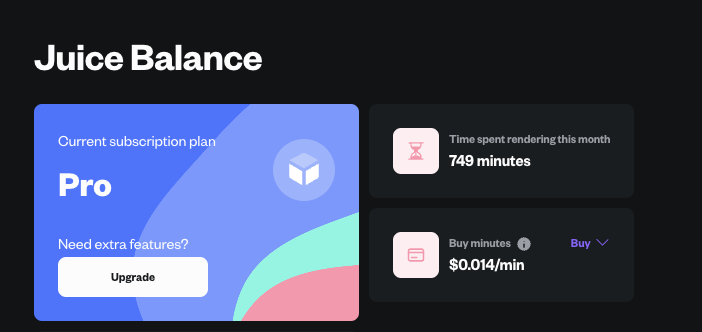
UI/UX Quality of Life
Dark mode 🌑 is now the default as opposed to light mode 🌕 by default! I asked around the team and turns out we’re all generally using dark mode to develop, so it’s only natural that the dark mode experience is slightly better than the light mode experience. The option is still available of course to toggle to light mode.We’ve also fixed some issues with the UI configurations including dark mode / light mode toggling and nav bar toggling not being saved across sessions. It should now properly save your dark mode sessions as dark mode, and your nav bar should stay minimized if that’s where you left it on your computer. This won’t persist across computers, yet, but this should hopefully offer 80% of the ideal experience.
Internal Error Reporting
We’ve improved our internal infrastructure to better handle reporting errors during the validation phase. This is crucial as it helps us be proactive and get on issues fast! This is what we’re known for and we definitely don’t want to slow down as the system gets more complex.Credit System Overhaul & Render UI Enhancements
Key Summary- Vastly improved credit system with a credits page for better visibility into remaining minutes for rendering.
- Rolled over minutes every month with no caps, allowing users to save up and render more.
- Improved switching between plans and automated billing processes.
- Added new statuses to the render upload wheel and smoothed out the loading experience.
- Fixed edge case issues with large file uploads causing navigation to act unexpectedly.
Credit System Launch
We’ve vastly improved our credit system and added a credits page underneath your Profile tab for better visibility into how many more minutes you have to render!

Render UI Improvements and Fixes
We’ve added a couple new statuses to the render upload wheel and smoothed out the loading experience so that uploading, validating, rendering, go smoother. There were a couple tiny edge case issues with large file uploads causing navigation to act a lil funky so we’ve fixed that.New Documentation Portal and Speed Boost for All
Key Summary- Improved stability and added support for Blender 3.6.8.
- Infrastructure improvements to handle upcoming Blender 4.x.x versions.
- Accelerated download and upload speeds now available for all subscription tiers.